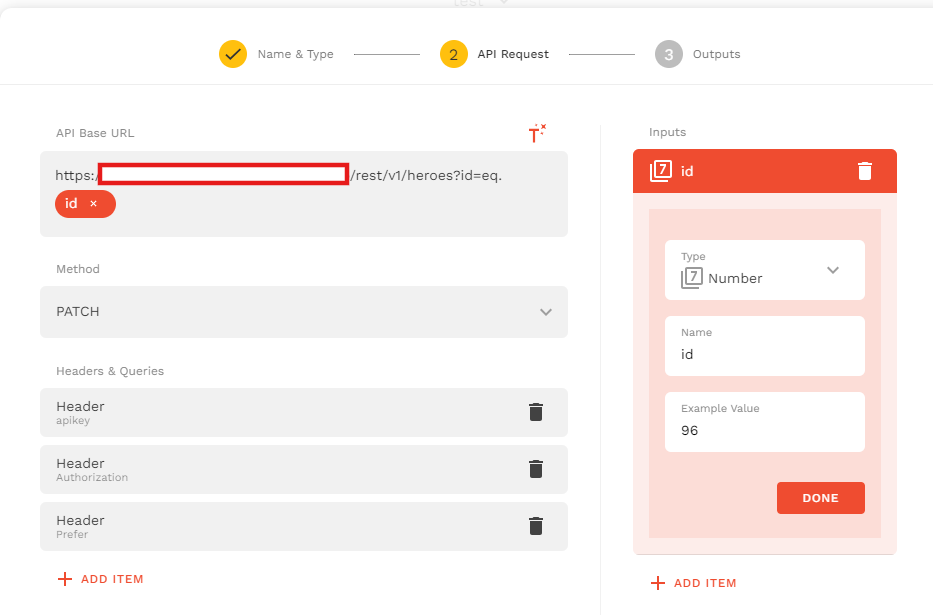
I’m really having a hard time and experiencing an issue with an External Collection connected to Supabase, where the {id} placeholder doesn’t seem to be substituted when performing an UPDATE.
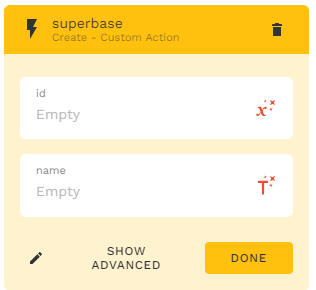
I’m not using a custom action as I am not familiar with it yet (non-tech person here :D). I’m using the normal update action from the API Test Set-up tho but I can try doing that too. I’ll let you know ina bit Thank you!
Hello @bttrszn, If you’re seeing 22P02 in the preview and the devtools show {id} literally being sent, then the record isn’t passing the actual primary key into the update call. A few things to double check:
Make sure the id field is returned in both GET ALL and GET ONE. If the list item doesn’t contain a real id, the placeholder won’t be substituted.
Supabase bigint can sometimes be interpreted as text, which blocks substitution. Exposing the id as an integer (or through a view) usually fixes it.
Using {id} in the query string (?id=eq.{id}) isn’t always reliable. An endpoint with /macro_inputs/{id} works consistently.
If you share your GET ALL response (without sensitive data), I can tell you exactly where the issue is coming from.
Should be a simple fix, instead one curly bracket, add two > save > should be good! I mean when setting up the external collection. ( for example, instead this : https://[project].supabase.co/rest/v1/macro_inputs?id=eq.{id}, make it like this : https://[project].supabase.co/rest/v1/macro_inputs?id=eq.{{id}} )
Thanks @Dilon! I tried this and there’s no error code but I couldn’t see the components on the next screen (screen b). It looks like the CREATE action on Screen A didn’t work although I can see rows were created on Supabase.
Thanks for sharing the GET ALL response. Your id is coming through correctly, but your adalo_user_id is returned as a string (“1”) instead of a number. When the list is filtered by adalo_user_id = Logged-In User > id and one side is numeric while the other is a string, the record loads visually but the underlying item doesn’t bind fully, especially the primary key. That’s why {id} stays literal during the update.
You have two options that you can try to fix it:
Store adalo_user_id in Supabase as a numeric type, not text.
Or expose it through a view as an integer.
After that, the list will pass the full record (including the PK), and the update request will correctly substitute the real ID.
This worked! I also added Query Parameter for: adalo_user_id = iq.{logged in user > id}, limit = 1 and order = id.desc to make sure the flow works. I also had to delete all actions and conditional visibility from the screen b and set it right back. Thank you, @Dilon !!
 Thank you!