I am trying to translate the information in the below table into Adalo. I have an idea, but I am hoping there is more simpler way achieving that compared to inputting each value individually. My Goal: After calculating income I need that number to be multiplied by the corresponding percent. For example, if the income was 55K and Single filer, the computed value will be 55,000 * 22%….Any ideas? Thanks
@carpantry1986 as I know progressive tax works in a way that higher rate is applied to the difference in the income, not to the whole amount.
Are you sure that for 55K you have to pay 22%? Usually you pay 22% for the amount over 47150, and then pay 12% for the amount of 35550 (=47150-11600) and 10% for 11600.
(Finally AI reply is useful for the forum thread!).
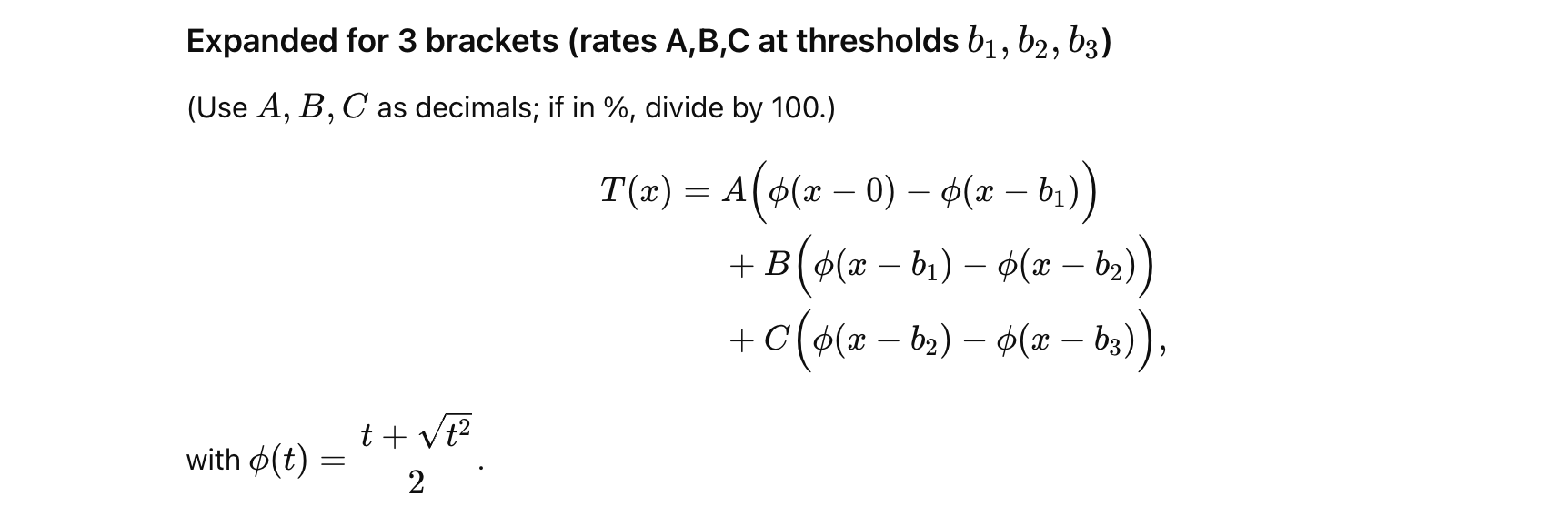
The issue in Adalo is that you will have to create conditional actions / labels, as for example formula #3 won’t work if X is below B2 (it’ll calculate negative result).
An alternative could be to make the expression in brackets to become 0 if it’s negative, and keep its value if it’s positive. One of the ways to do it is like this:
Yes, that is correct, but I did not want to make the question complicated. I just need to understand how to set up the formula first with a simple example and then I would have modified. So, yeah, I don’t think Adalo can handle piecewise and all that you posted. Thanks for the suggestion.
@carpantry1986 well, Adalo can do it, but it will be very annoying to implement this.
The main reason is that in formulas you can’t really move “magic text” and “math expression” elements in the formula edit field or cut/copy/paste them. So if you make a mistake in the formula, you can’t simply move the element into the correct place; very often you need to rewrite everything from scratch.
So the best way is first to write the formula on paper, make sure it is correct (manual calcs), and only after that copy that formula from paper to Adalo. As you can imagine, this process is lengthy and prone to errors.
E.g. in your case I know I can do this, but it will take quite a bit of time for me to implement. Sorry.
Jason @wjgilmore, this is one of the things which has always been extremely annoying when using Adalo formulas to calculate something more complex than a 2nd grade arithmetic. The way it’s done in Make isn’t perfect, but could we have at least something like that? That would be fantastic to have this fixed.