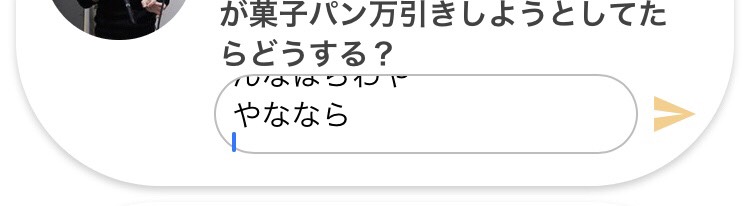
GOAL:
When I text short message, I want a chat box to be one line.

When I text some messages, I want a chat box to be adapted to the appropriate line.

Please help me to do this problem.
Hi @Eugen
Thank you for helping me.
Your chat field can be adopted when you make more than three lines?
I try to use default chat system, but the field is not adopted(means not expanded)
I built a chat app and is working good, with unlimited lines for the text. Chat rectangle automatically adapts to the message length
Field can only be adjusted in height
Did you make the input multi line? (Edit styles)
Hi @James_App_Maker
Yes, I think I’ve done, like here.
But, it is like this, the input does not extended to the message length.
Correct, you have to scroll with your finger inside the field to see the full text. Kind of annoying I know, but you could set the form higher to show more text
I don’t think is possible for the height of the text input to adjust dynamically. You can manually resize the input so more text could be visible at one time