Search Function Filter List - Non Sequence Input

Dear Support,

My issue seems to simple, my client wants to be able to search products with key words that’s in the Product description, but not necessarily in sequence.

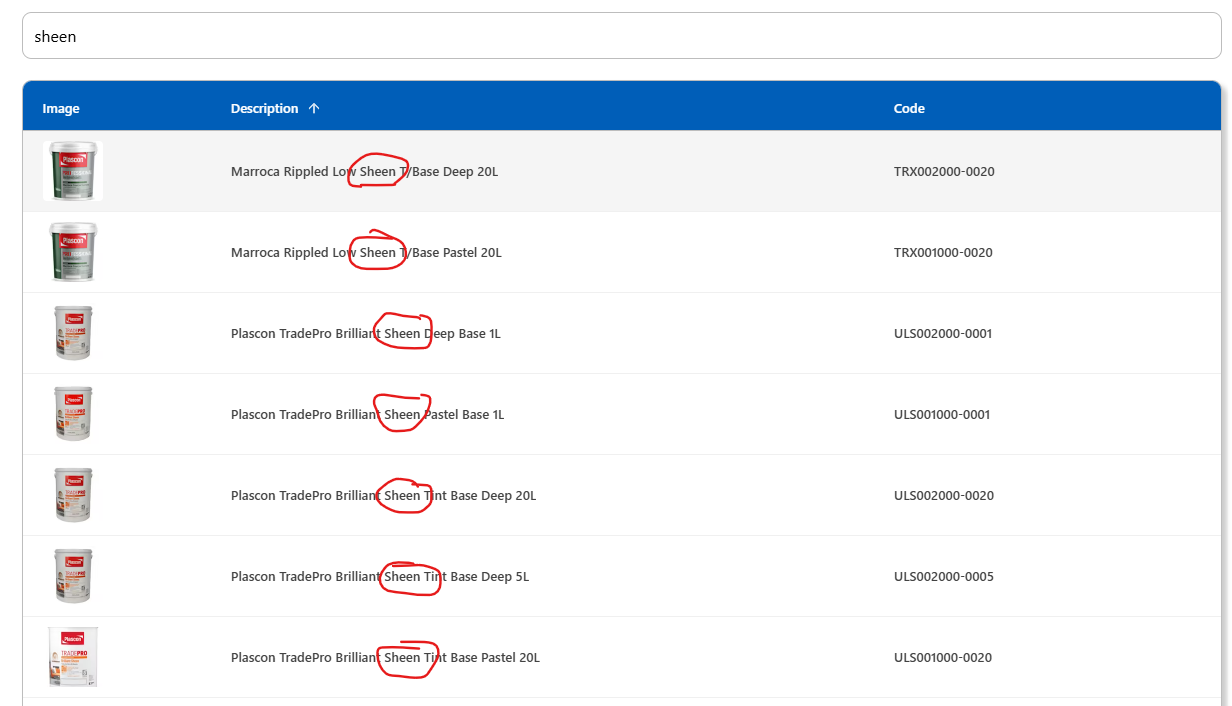
I have everything set-up correctly, my search function works and filters the list according to a single key word input:
or if you keep typing keywords in the correct sequence it keeps on working and displaying the correct related Products:
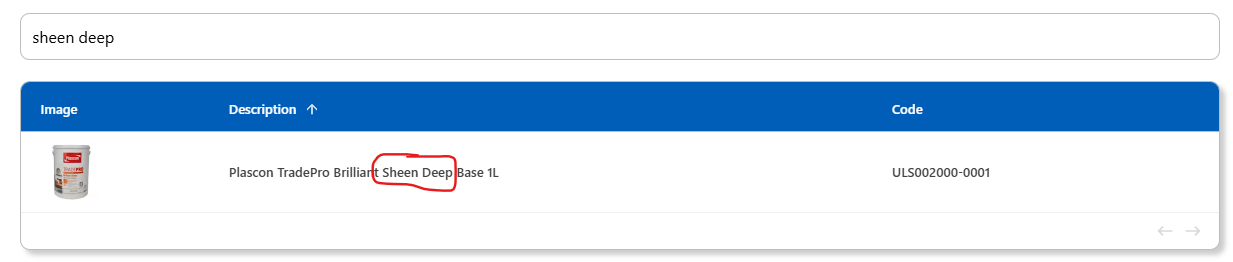
but as soon as you add a key word that’s not in sequence, for example the 20L found at the end of the Product description, the list doesn’t show anymore:

For example the Product Descriptions are:

Plascon TradePro Brilliant Sheen Tint Base Deep 20L

Dimensions Low Sheen Clear 20L

Promac Walldex Mid Sheen Deep 20L

In the above description, my client for example wants to list All the “Sheen 20L“ Products so they type in the search input:

Sheen (The list then adjusts and only show all the Products with the keyword “Sheen“ in the description) which is perfect… the problem is that the list at this point shows All the “Sheen“ Products, even the 5L, 1L, 500ML & 250ML… and we are only looking for the “20L Sheen“ Products…

So once you add the “20L” in the Search Input after the key word “Sheen“, the list disappears and shows nothing.

It seems as if Adalo doesn’t allow filtering based on a String value that’s not in sequence! Because of the missing keywords between “Sheen“ and “20L”, the list doesn’t filter or populate.

Like I said, my client wants the freedom the use any of the Product description key words, regardless if it is in the beginning or at the end, in any sequence possible to find the related list of Products.

Is this possible to achieve, or are we barking up the wrong tree?

1 Like

The search in Adalo is super problematic.

I’ve created endless keywords so users can find what they need.

It’s such a basic feature, and there’s still no solution after all these years.

I really hope it’s on their roadmap.
@james.crennan @wjgilmore

@nadavma2, thank you for your reply, and I understand the key word challenge and stringing endless data together in one “index” property to help the Search function and so on, even if I do that it doesn’t solve my problem because the customer can only use one phrase in the Search Bar that’s either a single word, or words in sequence to filter the list of Products…

In your professional opinion and having worked with this frustration for years, are there any way to achieve what my client requested or am I correct in my assumption and that Adalo has a limitation in this regard?

I think the solution is to use Xano - that way you have full control over the display, and it should work (though I don’t have personal experience with Xano).
There are other people here who know Xano and can give you a more precise answer.
Right now, there isn’t a built-in solution in Adalo, but I know the upcoming “Function Hub” they’re building is meant to handle exactly this.
I suggest reaching out to support, describe the issue in detail, and see what they recommend.
I’m in a similar situation - let me know if you find a solution.

I would say that full text search isn’t trivial even in a full-code environment. There are specific products built for that like Elasticsearch and Algolia.
As an example, have a look at this article Postgres Full-Text Search: A Search Engine in a... | Crunchy Data Blog to understand what should a software developer do to use built-in Postgres search.

So we can complain about Adalo’s limitations, but keep in mind Adalo is a no-code solution and a significant effort from Adalo’s development side is required to create a full-featured search.

Just my 2 cents.

BR,
Victor

1 Like

This topic was automatically closed 10 days after the last reply. New replies are no longer allowed.