Hello everyone,
I’m creating an event app and I’d like that when a user sees an event they want to join, by clicking the “Join Event” button they are automatically added to the event’s dedicated chat. I’ve already created the events and messages databases, as well as the relationships between them (although I’m not sure if they’re correct).
So far, I’ve managed to get to this point: when the organizer creates an event, the dedicated chat for that event is automatically created.
I hope I explained myself clearly. I don’t think it’s something too difficult to implement.
Thanks everyone for the support!
If I understand correctly, you need to make a one-to-many relationship and when you click the button, create an “update” action that will add it to the desired group.
What I want to achieve is a Chat Groups database (one group for each event) with a column for chat participants that works like the messages column. That is, when I click on the row of a chat group in the Chat Groups database, I can see all the users who joined the chat group by clicking the “participate” button.
The relationship between messages and chat groups is “One chat group, many messages,” but for participants I want all users to be able to join all events.
If I create an “update” action, it generates a new row in the Chat Groups database, but that’s not the result I want.
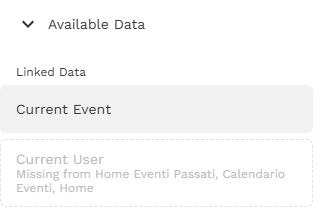
Thank you very much, following your advice, my event chat database updates with a new empty row. I’ll keep trying, maybe I didn’t connect the databases correctly.! I think the problem is on “availabe data” that i don’t have the database users but I don’t know how to add this data to the screen.
If you’d like, we could get in touch by email at alberto.depaolis11@gmail.com to talk about new business ideas and startups. Maybe we could even meet in person if you live near Milan/Como.
Talk to you soon
Since each event only has one chat, you can simplify the database logic.
3 collections required:
Users
Events
Chat Messages
Create a relationship between users and events (many-to-many). Users can attend many events, events can have many users (attendees).
Also, create a relationship between events and chat messages (many-to-one). Events can have multiple chat messages, chat messages belong to one event.
There is no need for a chat collection. As soon as the user taps the join button, simply add them to the event in the update event action to add > logged in user. Then, have your button that leads to chat and set the visibility of that to sometimes if “event > users > contains > logged in user”. If the user is not added, they won’t be able to view the chat.
Thanks for the suggestion, it sounds like a good idea, but how can I create the chat screen if I don’t have an event chat database? Right now in the app I’ve added a list as a component that shows all event chats with an event date is after than current time, and I’ll also need to add the filter visible only if “event > users > contains > logged in user.”
Thanks
What is a chat/conversation record? It is an “umbrella” for a conversation between multiple users, with the essential data like (a) relationships to users who can view / post messages in this conversation and (b) relationships to messages themselves (so a message belong to the chat).
In your case, you’ve stated that each Event should have one dedicated chat. Therefore: why would you need a separate Chats collection to store the chat/conversation record? Anyway it’ll be just one chat per event. You already have relationships between users and events, so you know who can view/post messages.
So that’s why there is no need for a separate collection, you can connect messages to the event itself. And you can add more chat-specific properties to the event collection (e.g. last message posting time, etc.).
In other words, Events record serves 2 purposes: store info about the event and about event’s chat at the same time.
And if you’d like to have a separate “chats list” screen, you make a screen with a list of events, showing events for a user, but you design it like a list of chats.