I found a reproducible crash after switching to the new React Native version in Adalo.
When a component that references Current Message is placed inside a Custom List, the app crashes immediately when opening the page.
Platform: Adalo native app
Behavior: works fine when the same component is outside the list
Previously: this worked without issue before switching React Native version
Now: crashes consistently after turning on the new React Native version
Likely cause: rendering loop or state conflict with the new architecture
Steps to reproduce:
Enable “Use new React Native Version” in app settings
Create a Custom List
Place a component that references “Current Message” inside the list
I believe it’s a good idea to submit a ticket to Adalo. I’ve experienced crashes with new React Native in several cases. Major version upgrade is always a pain, so I hope Adalo can sort this out.
So you have white screen both on new React Native and old React Native, and both on iOS and Android? And web version works fine?
If that, I’d think about some component causing this.
But unfortunately there are very little things which we can do by ourselves with the native apps’ crash. There might be some hints on what’s causing the crash in the logs (on iOS it’s General → Privacy and Security → Analytics & Improvements → Analytics Data, then there may be some log file named as the app).
The problem is that one needs knowledge to understand these logs, and anyway it doesn’t give the way to fix the native build.
So submitting a ticket to Adalo is the only way to resolve this.
In regards to your experience with support - maybe @CH_Team could comment?
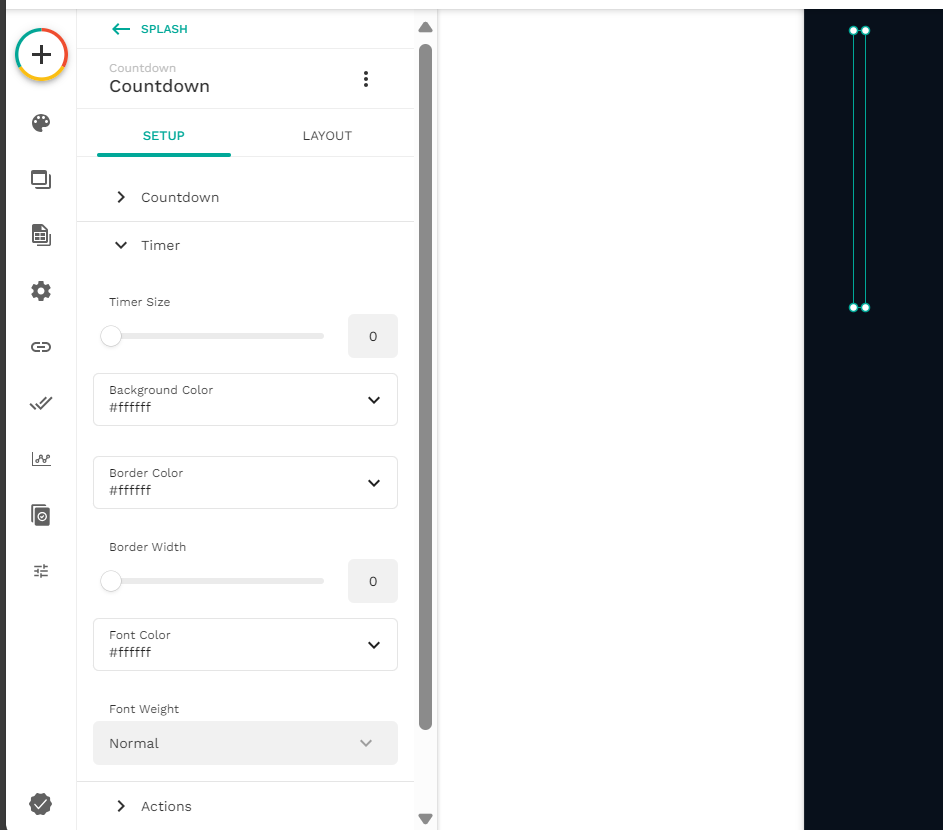
I’ve recently had a crashing issue after submitting a new build (react native version toggle has been turned on) in Google which wasn’t able to open the app so it’s crashing from the start. It was alright before the new updates but then it started crashing. After checking the logs in Google Play Console (Monitor and Improve section > Android vitals group > Crashes and ANRs section), it was due to 0 in the countdown timer of the welcome screen.
We’re really sorry for the delay, we’re actively working on your ticket. Also, our support member has just responded to your email. Since it’s Diwali here in India (a national holiday), our support team is running a bit short-staffed at the moment.
We truly appreciate your patience, and we’ll make sure to get back to you with an update as soon as possible.