I built my Adalo app with Xano integration from the beginning and the two work happily together. The exception is Xano login via “Xano login” action. In Xano my auth/login replies with 200 OK and the token, followed by auth/me reply with 200 OK and this body (Postman confirms the same and yes I changed the credentials in this output):
However, the Adalo screen always shows “Login Failed” and I get the same behavior whether using Adalo’s login form or my own. Why does Adalo not like that returned JSON?
The reason your Adalo login isn’t working isn’t because the JSON is “wrong”, it’s just that Adalo expects the login response to have a very specific format.
So in Xano:
Make sure your auth/login endpoint returns a token field at the top level. Wrap the user information inside a user object. Once you do that, the Adalo login action should work properly.
If you want, I can give a step-by-step example of how to set up your Xano auth endpoint specifically for Adalo, so it works without errors.
You’re using the Xano integration right? Xano login action consist this below JSON which only need to input email and password. You’re trying to signup (add new user) a user? :
Thank you for your reply! Yes what is interesting is that the auth/login piece works just fine, Xano replies with a token (shown below) and then Adalo automatically follows up with a GET to auth/me (which includes the token) and Xano replies with the user info corresponding with that token. Yes if you can show your Xano auth endpoint I would really appreciate it? I know it’s going to be something simple but I haven’t found it yet. Thank you!
Thank you for your reply! Yes I am using the Xano integration, I designated Xano integration right when I first initiated this app in Adalo. The user already exists in the Xano database, Adalo sends a POST to auth/login and Xano successfully replies with a token like this:
Adalo then sends a GET to auth/me using that token, and Xano successfully replies with the user info that corresponds to that token: {“id”:5,“name”:“test user",“email”:"test@gmail.com”,“created_at”:1762632586530}
But for some reason Adalo does not like that reply from Xano. I’m using the Xano integration which is very straightforward but it seems like something under the hood isn’t working. Please let me know what additional information I can provide, and thank you for your help!
I’m a bit confused of what’s going on as Xano login action works fine for me. Would you be able to share a short screen recording showing your login form, login actions, xano auth endpoints and app preview? You can use loom.com.
The issue seems to happen during the /auth/login API call to Xano. The request is returning a warning in the API request history, which usually means the login inputs sent from Adalo don’t exactly match what Xano expects, for example, the field names or how the password is being validated in the function stack.
A few things to check:Make sure the email and password keys in Adalo match the input names in your Xano API endpoint. In Xano, verify that the “Check Password” function is using the correct database field and authentication logic. Confirm that Adalo’s API response setup is capturing the AuthToken properly (you can test this in the API setup screen).
Once those align, the login flow should work correctly.
If you’re testing from Adalo’s “Test Request” section, try sending raw JSON input using the same field names defined in Xano to see if the response comes back clean. That helps confirm it’s just a mapping mismatch.
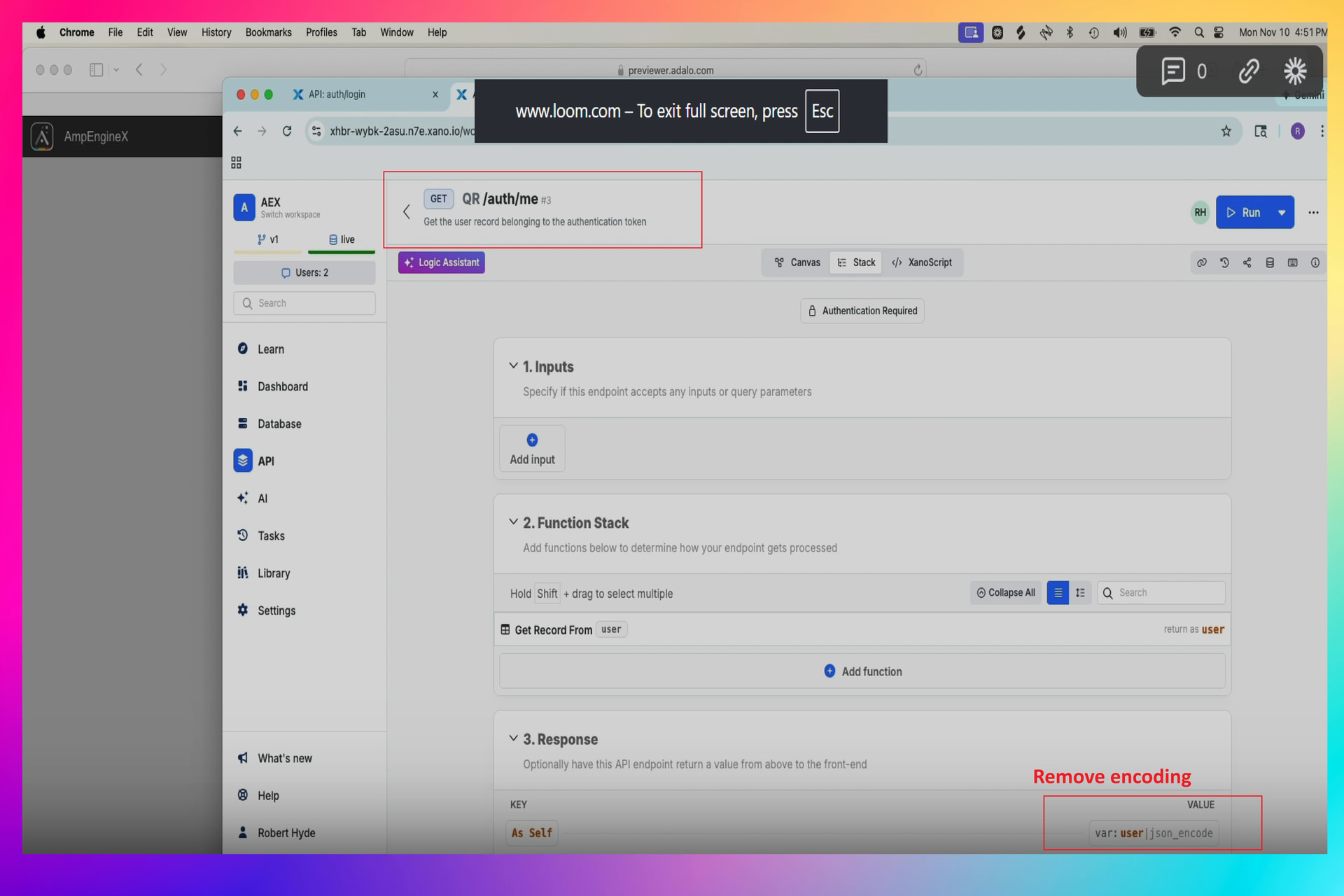
Looks like you’re encoding the response, so could you remove that encoding filter from the response > publish the changes and try again to login in the Adalo app?
Good catch - I had added that encoding during troubleshooting, it shouldn’t be there. Unfortunately I still have the same problem after removing it (see new screenshots below including auth/me reply). What info can I provide next? Thank you for your help!
A quick update - I created a new API endpoint in Xano that uses the same user table. Then I created a new app in Adalo using the new API endpoint, and login works just fine. So I will compare the old and new API endpoints and will let you know what I find. Thanks!
I can point my main app (the one giving me login problems) to my new API endpoint for login and now login works perfectly! But I will still compare the API endpoints and let you know the difference for your reference. The issue was definitely with the API endpoint somehow.